
Funding FAQs

- How do I fund my account?
- How do I fund my account with Neteller/Skrill?
- How do I fund my account via Local Currency Online Transfer?
- Can I fund with a personal check or business check?
- How is my money protected?
- What is third-party funding?
- Can I use more than one card to fund my account?
- What should I do if the card I used to fund my account is closed, lost, stolen or not available for withdrawal?
- Does FOREX.com accept Revolut and Wise?
- Does FOREX.com accept Western Union or PayPal?
- How will a card deposit appear on my bank statement?
- Why is the amount posted in my account less than the amount I wired?
How do I fund my account?
You can easily fund your account via local currency online transfer, credit card, debit card, or wire transfer by logging in to MyAccount and visiting the Funding page.
Local Online Transfers
| Min per transaction* | Max per transaction**** | Accepted Currencies*** | Typical processing Time^ | Fees** |
|---|---|---|---|---|
| $100 or currency equivalent | $10,000 or currency equivalent | USD, ARS, MYR, THB, VND, IDR, PHP, BRL, COP, CRC, CLP, MXN, PEN, ZAR | 0 - 30mins | None |
Credit or Debit Card
| Min per transaction* | Max per transaction | Accepted Currencies | Type | Typical Processing Time | Fees** |
|---|---|---|---|---|---|
| $100 or currency equivalent | $10,000 or currency equivalent | USD, EUR, GBP | Visa, Mastercard | Immediate | None |
Wire Transfer
| Min per transaction* | Max per transaction | Accepted Currencies | Typical Processing Time | Fees** |
|---|---|---|---|---|
| None | None | USD, EUR, GBP | Up to 1-2 business days | None |
Neteller or Skrill
| Min per transaction | Max per transaction | Accepted Currencies | Typical Processing Time | Fees |
|---|---|---|---|---|
| $100 or currency equivalent | $10,000 | USD, EUR, GBP*** | Immediate | None |
*The minimum initial deposit is $100 or currency equivalent. We recommend that you maintain an adequate excess margin balance above your required margin. Maintaining low excess margin levels in your account may prohibit you from trading certain products or lead to undesired liquidations resulting from an adverse market move.
**FOREX.com does not charge incoming deposit fees. However, your bank may charge a service fee.
*** currency conversion rates will apply when funding or withdrawing.
**** The maximum initial deposit may vary per country.
^ May vary depending on provider.
How do I fund my account with Neteller/Skrill?
To fund your account, you will need to have an active ewallet with Neteller or Skrill – you can open your account here:
You will find the options to fund with your e-wallets through the MyAccount portal.
How do I fund my account via Local Currency Online Transfer?
Online Bank Wire
Our Online Bank Wire option lets you make secure payments directly from your device through a quick, step-by-step process:
- Select your bank.
- Log in using your online or mobile banking credentials.
- Transfer funds from your own bank account using your Mobile Banking App or Online Banking platform.
- Review and verify your payment details on the instruction page.
- Confirm your payment. Your transaction will be processed securely.
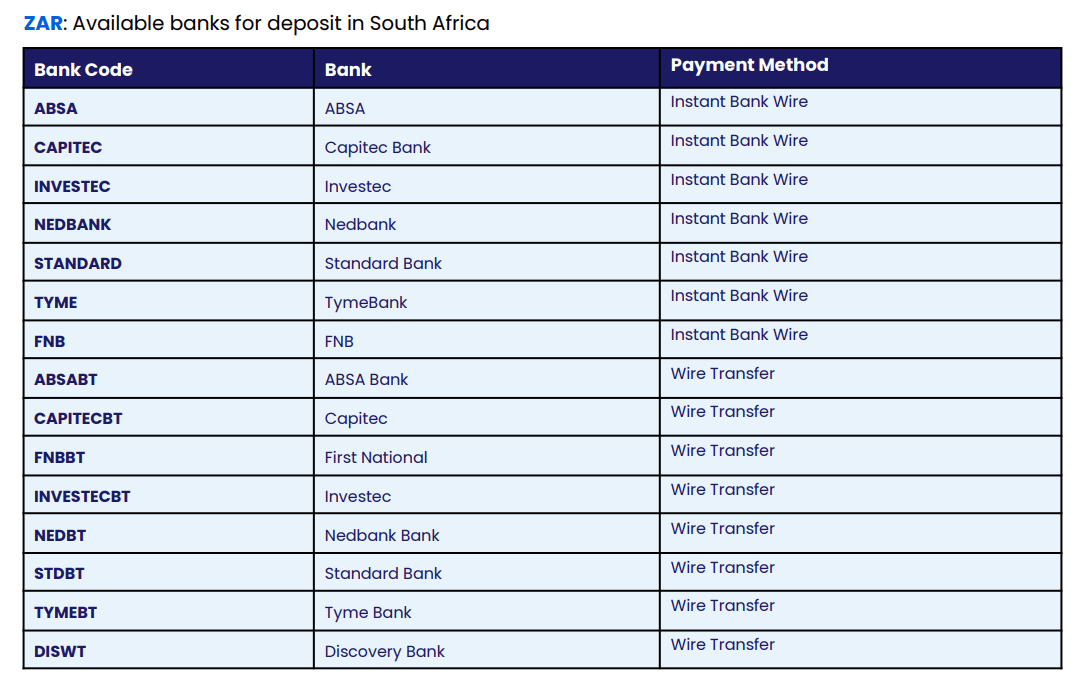
During the payment process, eligible banks will be displayed. For example, refer to the below screenshots:
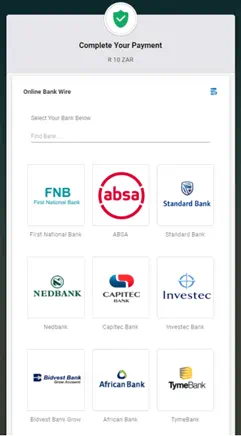
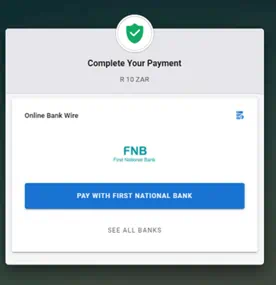
After selecting your bank, you’ll be redirected to your bank’s secure login page. Enter your online banking details (and the One-Time Password, if prompted by your bank) to complete the payment by following the on-screen instructions.
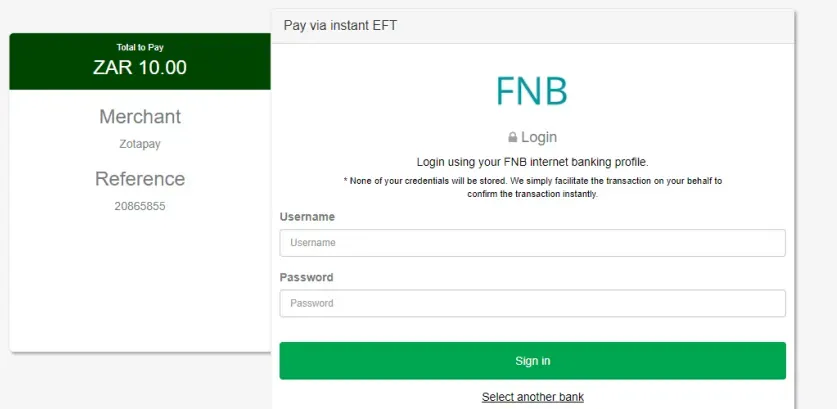
Some banks may require you to enter a Transaction Authorization Code (TAC) to verify your payment. This code is sent to your registered contact method or device by your bank. If you experience any issues receiving your One-Time Password (OTP) or TAC, please contact your bank directly for assistance.
Offline Wire Transfer
The Offline Wire Transfer option allows you to make secure payments directly from your device by initiating a transfer to a designated corporate account.
How it works:
- Select your bank.
- Log in to your online or mobile banking platform.
- Initiate the transfer and validate the payment using your bank’s receipt or confirmation.
- Your payment will be processed securely.
Please note:
If you choose to make a standard wire transfer, it is typically processed within 24–48 hours. Processing times may vary depending on your bank’s business hours, as well as weekends and public holidays, which can cause delays.
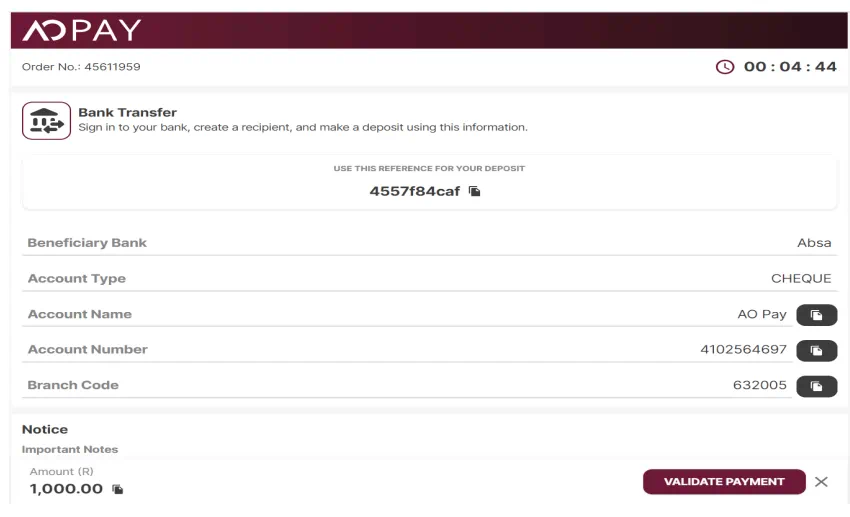
Important: To ensure your funds are credited successfully, you must enter the reference number provided on the instruction page when making your payment.
Deposit Limits
Please refer to the table below for the deposit limits:

Deposit Banks List
Can I fund with a personal check or business check?
No, FOREX.com does not accept checks as a funding method at this time.
How is my money protected?
We understand that the safety of their funds is of utmost importance to all our clients, so we make funds security a top priority.
Please note that in accordance with CIMA regulation in Cayman, FOREX.com strictly adheres to CIMA client money rules requiring that all client funds be segregated and separately accounted for to protect our client’s assets. As such, FOREX.com has trust letters in place with all depositories that hold client assets and we perform a daily client segregated funds calculation to ensure all client assets are adequately segregated.
In the unlikely event of a default, all client assets would be protected, and the segregated clients would have creditor priority over any and all claims. In addition, FOREX.com maintains significant excess capital in excess of regulatory requirements, actively reviews and monitors counterparty risk and is governed by a risk committee comprised of Senior Management members.
What is third-party funding?
A third party is considered to be anyone who is not an owner of the account.
For the purposes of a funding or withdrawal transaction, the name(s) on the FOREX.com trading account must be an exact match with the name(s) on the account of the other financial institution.
Can I use more than one card to fund my account?
Yes, you may use multiple cards to fund your account. Keep in mind that withdrawals are processed to the original funding methods. Therefore, a single withdrawal request may be processed via multiple cards.
What should I do if the card I used to fund my account is closed, lost, stolen or not available for withdrawal?
In accordance with our anti-money-laundering policy, we are legally obligated to verify the status of the original funding account before we can process a withdrawal of funds to another source.
In the event that the original funding account is no longer available, you will need to provide us with evidence of its status, such as an account statement or relative document issued by your bank. Documentation must include the following:
- Name of the account holder (must match name on FOREX.com account)
- Last four digits of account number and/or payment to FOREX.com
- Language noting the status change of your account
Does FOREX.com accept Revolut and Wise?
Yes! You can make deposits to your FOREX.com account using Revolut or Wise.
We accept deposits via a debit/credit card (Visa or MasterCard) or wire transfer.
To fund your account using your debit or credit card, simply follow these steps:
- Log in to your MyAccount portal.
- On the homepage, click “Fund.”
- Select “Debit/Credit Card.”
- Link your card and enter your payment details as instructed on screen.
- Once your card is saved, you can deposit instantly through the portal.
Having trouble?
If you encounter any issues or see an error message, try clearing your cookies and browsing history related to FOREX.com, then log in again.
If the problem persists, please contact our Live Chat team for immediate assistance.
If you’d like to make a wire transfer, simply:
- Log in to your MyAccount portal.
- On the homepage, click “Fund.”
- Select “Bank Transfer.”
- Choose the currency you’d like to deposit in.
- You’ll then see our bank account details for the transfer
Please double-check that all FOREX.com bank details are entered correctly when funding via Revolut or Wise account to ensure your payment is credited successfully.
Does FOREX.com accept Western Union or PayPal?
No, we do not accept payments through Western Union or PayPal.
How will a card deposit appear on my bank statement?
When you deposit funds into your FOREX.com account via a card, it will appear as a purchase.
Why is the amount posted in my account less than the amount I wired?
Your deposit may be reduced by a service fee charged by your bank. FOREX.com does not charge incoming wire fees.